Cute Retro Ribbon Bows Vector Clipart: A Guide to Quality and Usage
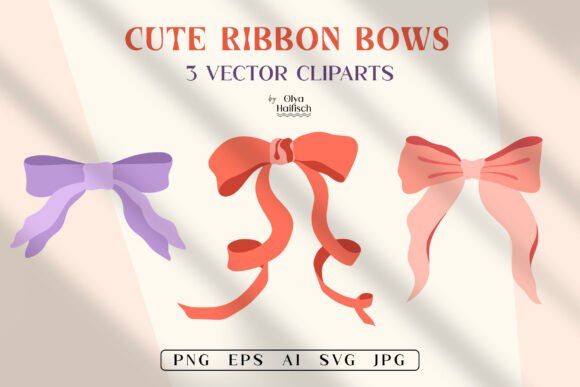
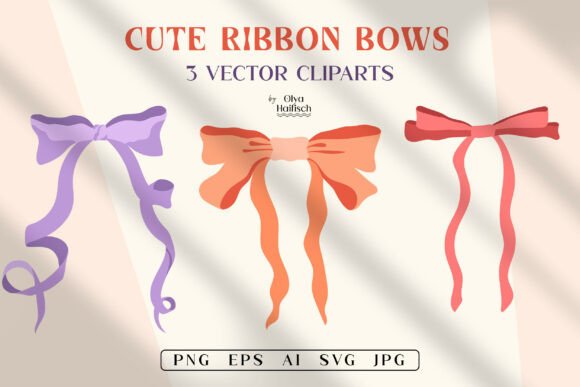
The resurgence of the coquette aesthetic and Y2K girlycore trends has created a significant demand for high-quality decorative elements. Among these, Cute Retro Ribbon Bows Vector Clipart stands out as a versatile asset for designers, crafters, and small business owners. Whether you are creating sublimation designs for t-shirts, crafting personalized invitations, or developing digital content for social media, the right bow illustration can elevate your project from amateur to professional. However, navigating the world of digital clipart requires more than just finding an image that looks pretty. Many creators overlook critical technical details, leading to frustration during the production phase.
This guide explores the essential considerations when selecting and using cute ribbon bows vector clipart sets. By understanding common pitfalls and adopting best practices, you can ensure your designs remain crisp, scalable, and commercially viable.
Understanding the Value of Vector Formats
One of the most frequent mistakes beginners make is prioritizing raster images (like standard JPEGs) over vector files. While a PNG with a transparent background is useful for quick drag-and-drop projects, it has fixed dimensions. If you attempt to enlarge a 4000px PNG for a large wall art print or a billboard, the image will pixelate, resulting in blurry edges and a loss of quality. This is where the true power of Cute Retro Ribbon Bows Vector Clipart lies.
Vector files, such as EPS, AI, and SVG, use mathematical equations to define shapes rather than pixels. This means you can scale a tiny bow from a diary cover design up to the size of a building wrap without any loss in resolution. For entrepreneurs selling physical products, this scalability is non-negotiable. It allows you to use the same asset across various product lines, from small stationery items to large textile prints, without needing to purchase multiple versions of the same graphic.
Common Mistakes in File Selection and Preparation
When downloading a Cute Ribbon Bows Vector Clipart Set, many users fail to verify the included formats. A common misconception is that all "digital downloads" are created equal. Some sellers provide only low-resolution JPGs, which are unsuitable for professional printing. Others may provide vectors but fail to include PNGs with transparent backgrounds, forcing you to manually remove backgrounds—a time-consuming task that often yields imperfect results.
The Impact of Poor File Choices:
- Increased Production Time: Manually editing low-quality images or removing backgrounds eats into billable hours.
- Print Errors: Using RGB color profiles instead of CMYK for print-ready files can result in colors that look dull or shifted when physically produced.
- Limited Versatility: Lack of vector files restricts your ability to customize colors or shapes to fit specific brand guidelines.
To avoid these issues, always check that your download includes a comprehensive suite of formats. A high-quality set should offer PNGs with transparent backgrounds at high resolution (300 DPI), alongside editable vector files like EPS, AI, and SVG. The inclusion of JPGs is beneficial for quick previews or web-only use, but they should not be your primary source for design work.
Color Accuracy and Monitor Calibration
Another overlooked detail is color consistency. The vibrant reds and purples seen in girlycore-inspired romantic bows may look striking on your calibrated monitor but can appear muddy or washed out when printed. This discrepancy occurs because screens emit light (RGB), while printers reflect light (CMYK). Without proper preparation, the "cute kawaii bows" you designed might not match your brand’s aesthetic once they are on fabric or paper.
Practical Advice for Color Management:
- Request Proof Prints: Before running a large batch of t-shirts or invitations, print a single test item. Compare the physical output to your screen and adjust your design file accordingly.
- Understand Your Printer’s Profile: Different sublimation printers and fabric types absorb ink differently. Synthetic fabrics may yield brighter colors than cotton blends.
- Use Standard Color Codes: If possible, work with HEX or CMYK codes that are known to print well, rather than relying solely on visual approximation.
Remember, slight variations are normal due to monitor settings and printer mechanics. However, being proactive about color testing prevents costly reprints and customer dissatisfaction.
Licensing and Commercial Use Considerations
While not explicitly stated in every product description, understanding licensing terms is crucial for professionals. Many creators assume that purchasing a digital download grants them unlimited commercial rights. While many artists, such as Olya Haifisch, offer flexible usage for DIY ideas and small business products, it is essential to read the specific license agreement. Some licenses may restrict the number of physical items you can sell or prohibit the use of the clipart in logo design.
Using assets incorrectly can lead to copyright strikes or legal issues, which can shut down an online store or damage a professional reputation. Always verify whether the Cute Retro Ribbon Bows Vector Clipart you are buying allows for commercial use, especially if you plan to sell products on platforms like Etsy, Amazon Merch, or Shopify. If the terms are unclear, contact the creator directly. A simple email can clarify permissions and save you from potential headaches down the line.
Maximizing Utility Across Different Mediums
The versatility of hand-drawn vector illustrations allows them to be used in diverse applications. However, each medium has specific requirements. For example, when using these bows for png sublimation, ensure the background is truly transparent. Any stray white pixels around the edges of the bow will become visible on dark fabrics, ruining the seamless look. Similarly, for t-shirt prints, consider the placement and scale. A bow that looks balanced on a greeting card might appear too small or cluttered on a garment.
Tips for Specific Applications:
- Stationery and Invitations: Use the vector files to adjust the opacity or layer the bows behind text for a subtle, elegant effect.
- Wall Art and Posters: Leverage the high-resolution PNGs or vectors to create large-scale prints. Group multiple bows to create a pattern or border.
- Digital Media and Blogs: Optimize file sizes for web use. While the original files may be large, compress them for faster loading times on websites and social media platforms.
- Textile and Fabric Prints: Repeat the vector elements to create seamless patterns. This is particularly effective for the coquette aesthetic, which often features repetitive, delicate motifs.
Final Checks Before Downloading and Using
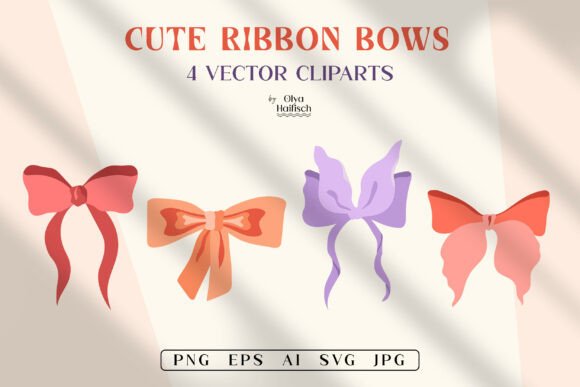
Before finalizing your purchase or starting your design process, take a moment to review the product details thoroughly. Ensure that the set includes the four clipart elements promised, and verify the file formats. Check that the resolution is sufficient for your intended use—300 DPI is the standard for high-quality printing. Additionally, remember that fonts, text, mockups, and preview scenes are typically not included in the download. These are for demonstration purposes only, so do not expect to replicate the exact layout seen in promotional images without sourcing your own typography and layout tools.
By approaching Cute Retro Ribbon Bows Vector Clipart with a strategic mindset, you can avoid common pitfalls and maximize the value of your digital assets. Whether you are a hobbyist creating diary covers or a professional designer developing a new clothing line, attention to detail in file selection, color management, and licensing will ensure your projects succeed. If you have questions about specific usage cases, do not hesitate to reach out to the creator. Clear communication ensures that you get the most out of your creative resources.