Silhouette Street Lamps and Trees Vector: A Guide to Quality and Application
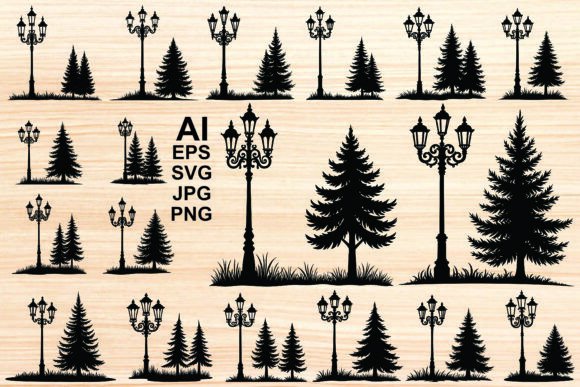
Visual storytelling relies heavily on the clarity of its elements. When you are designing a park scene, a garden layout, or a vintage-inspired landscape, the interplay between light and nature sets the mood. This is where a high-quality Silhouette Street Lamps and Trees Vector becomes an indispensable asset. These graphics are not merely decorative; they are functional design components that define space, era, and atmosphere without cluttering your composition with unnecessary detail.
However, the abundance of digital assets available today can lead to poor decision-making. Many creators rush to download the first free file they find, only to discover later that the lines are jagged, the layers are unorganized, or the style clashes with their project’s aesthetic. Understanding what makes a vector bundle truly useful—and how to avoid common pitfalls—can save you hours of frustration and significantly elevate the professionalism of your work.
The Trap of Low-Resolution Substitutes
One of the most frequent mistakes beginners and even some experienced designers make is confusing raster images with true vectors. You might find a JPEG or PNG that looks like a crisp black silhouette of a vintage lamppost or a coniferous tree. At a small size, it appears perfect. But the moment you scale it up for a large format print or a high-definition screen, the edges pixelate and blur.
This happens because raster files are made of pixels, whereas vectors are made of mathematical paths. A genuine vector illustration allows you to resize your ornate street light or pine tree infinitely without losing quality. If you are working on a project that requires scalability, such as signage, vehicle wraps, or responsive web headers, relying on a non-vector file is a critical error. It limits your flexibility and forces you to restart the design process if the client requests a larger format.
The Better Approach: Always verify the file formats before downloading or purchasing. A professional bundle should include AI, EPS, and SVG files. These formats ensure that every curve of the antique lamp post and every needle of the evergreen tree remains sharp, regardless of size. Check the preview images closely; if the edges look soft or fuzzy in the preview, it is likely not a true vector.
Overlooking Style Consistency
Another common oversight is mixing incompatible styles within a single composition. You might select a highly detailed, ornamental Victorian-style lamppost and pair it with a simplistic, modern geometric tree silhouette. While creativity is encouraged, this mismatch often results in a disjointed visual narrative. The eye expects a certain level of detail consistency across all elements in a scene.
For instance, if you are creating a classic park landscape, using a traditional gas lamp silhouette alongside a rough, sketchy tree outline can create visual tension that distracts from the main message. Conversely, pairing a clean, simple modern street light with a hyper-realistic pine tree silhouette can feel equally awkward. The lack of cohesion makes the design look amateurish, as if elements were grabbed randomly from different sources.
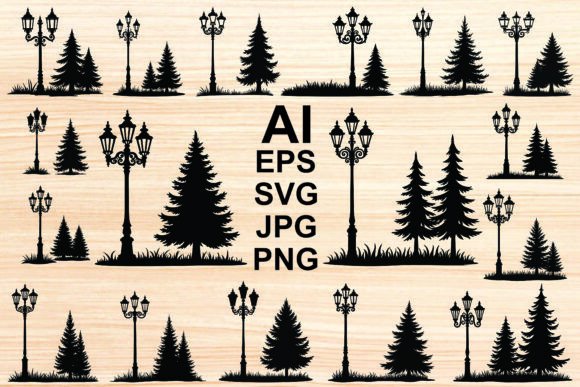
The Better Approach: Curate your assets from a unified collection. A well-designed silhouette vector bundle offers various elements—such as black silhouette vintage lampposts and coniferous trees—that share the same line weight, level of intricacy, and artistic intent. Before finalizing your design, lay out all your chosen elements side by side. Do they look like they belong in the same world? If one element feels too heavy or too light compared to the others, swap it for a more compatible option from the same set.
Ignoring File Organization and Usability
Efficiency is key in professional design, yet many users overlook the importance of file organization. Downloading a zip file containing hundreds of unsorted graphics can be overwhelming. Some creators make the mistake of opening every single file to check its content, which is time-consuming and inefficient. Others fail to extract the files properly, leading to software errors when trying to open compressed AI or EPS files directly.
Moreover, not all vector files are created equal in terms of layer management. A poorly constructed vector might have thousands of unnecessary anchor points or grouped elements that are difficult to separate. If you want to change the color of just the lamp glass while keeping the post black, a messy file structure will make this task tedious. This affects your workflow speed and can lead to dissatisfaction with the asset, even if the visual style is correct.
The Better Approach: Look for bundles that advertise "clean" and "organized" files. When you download a package containing JPG, PNG, AI, EPS, and SVG files, take a moment to organize them into folders on your drive. Use tools like WinZip or WinRAR to extract the contents properly. Before committing to a large project, test one file. Open the AI or EPS file in your preferred software. Are the layers logical? Can you easily isolate the decorative element from the background? Choosing assets that are ready for immediate use saves valuable time and reduces technical friction.
Neglecting Licensing and Usage Rights
Perhaps the most serious mistake involves ignoring licensing terms. Many designers assume that if a file is downloadable, it is free to use for any purpose, including commercial clients. This misconception can lead to legal issues and financial penalties. Some "free" vectors are restricted to personal use only, while others require attribution. Using a vintage style street light silhouette in a client’s logo or a product packaging design without the proper commercial license is a risk not worth taking.
Additionally, some users fail to consider the versatility of the asset. They might buy a pack specifically for web use, only to realize later that they need print-ready files. This results in double spending and wasted resources.
The Better Approach: Always read the license agreement included in the bundle. A reputable provider will clearly state whether the designs can be used for commercial purposes, print-on-demand products, or digital marketing. Ideally, choose a bundle that offers broad usage rights, allowing you to apply the outdoor lighting and nature silhouettes across various media without restriction. Verify that the package includes multiple formats (JPG, PNG, AI, EPS, SVG) to ensure you are covered for both digital and print applications.
Making the Right Choice for Your Design Needs
When evaluating a Silhouette Street Lamps and Trees Vector collection, think beyond the immediate project. Consider the longevity and adaptability of the assets. A high-quality set of isolated silhouettes serves as a versatile toolkit. You can use the fir and pine shapes for holiday designs, the ornate lamps for historical themes, and the clean outlines for minimalist infographics.
Check for variety within the bundle. Does it offer different angles? Are there options for both dense foliage and sparse branches? Variety allows you to create depth in your landscape compositions by layering foreground and background elements effectively. A good collection provides an arrangement of multiple and various designs that prevent repetition and keep your visuals engaging.
In conclusion, selecting the right vector assets requires attention to detail, technical awareness, and an eye for stylistic harmony. By avoiding low-resolution substitutes, ensuring style consistency, prioritizing organized files, and respecting licensing terms, you empower yourself to create polished, professional designs. Whether you are a freelancer crafting a brand identity or a hobbyist designing a garden invitation, the right graphic design elements make all the difference. Invest time in choosing quality resources, and your final output will reflect that care and precision.